
Feature of the Week: The CRM and CRM Calendar
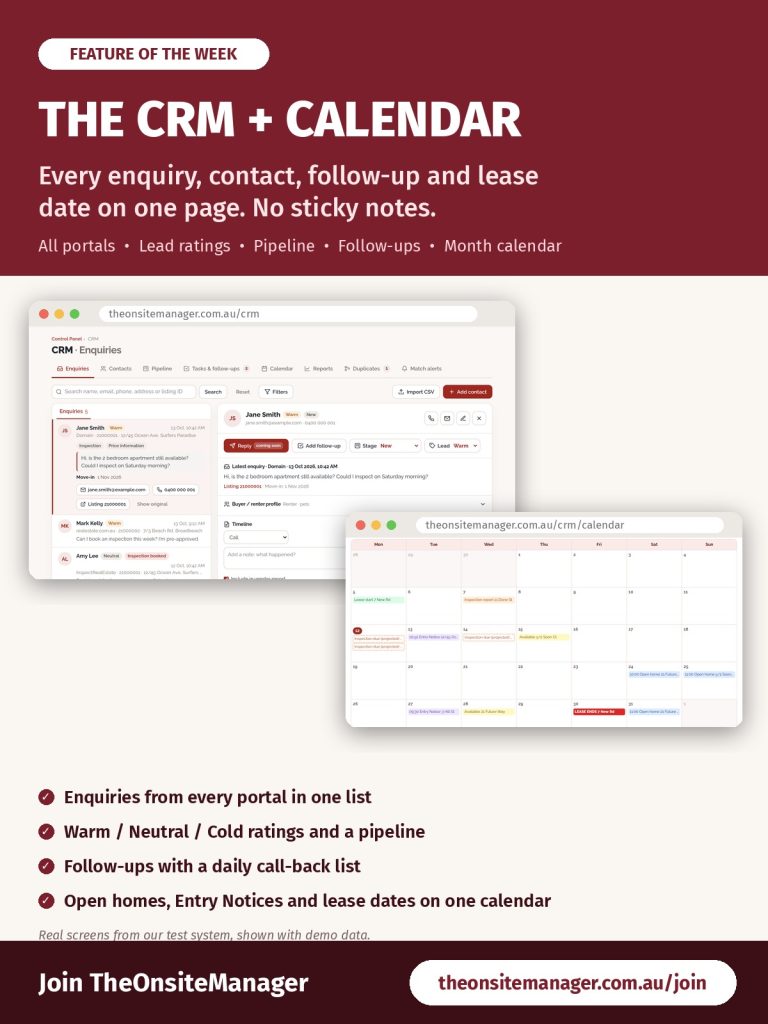
Enquiries from realestate.com.au, Domain and Inspect Real Estate in three different inboxes. Call-backs on sticky notes. Lease end dates you only remember when the tenant asks. With TheOnsiteManager, every enquiry, contact, follow-up and date sits on one CRM page.
Every enquiry in one list
Open the CRM from the Control Panel. The Enquiries tab shows every enquiry from every portal, newest first, including inspection bookings, open home check-ins and applications. Search by name, email, phone, address or Listing ID, or use Filters to narrow by portal, listing and date. Select an enquiry to read the full message, move-in date and finance details, with the contact card beside it.
The contact card
Rate each person Warm, Neutral or Cold, and move them through your pipeline: New, Contacted, Inspected, Applied, Leased/Sold. Choose Reply to pick a template that fills in their name and the listing; the email is logged on their timeline, and their reply is added too. Add notes (Call, Left voicemail, Sent SMS and more) and tick Include in vendor report for anything the owner should see in their campaign report.
Never miss a call-back
Add follow-up creates a task with a due date and time. The Tasks & follow-ups tab becomes your call-back list, with a red number for anything due today or overdue. Follow-ups also show on the Calendar tab and in the notification bell.
Pipeline, reports and clean data
Drag cards across the Pipeline board as leads progress. Reports shows your enquiries for the last 30 days and your median response time by portal and by listing. Duplicates finds people who enquired on both REA and Domain; nothing is merged unless you choose Merge, and every merge can be undone. Match alerts show which of your current listings suit what a contact is looking for.
The CRM Calendar
The Calendar tab puts everything happening at your listings in one month view: open homes (with registered vs attended), Entry Notices from The Form Manager, lease starts, lease end dates in solid red, available dates, projected routine inspections every 90 days and Inspection Manager reports. Copy your private subscription link from Calendar settings to see it all in Google, Apple or Outlook calendars.
Works on your phone
The CRM and the CRM Calendar both work on a phone, so you can check a contact or your day from the car park.
Get started
Not with TheOnsiteManager yet? Sign Up Now and keep every lead in one place.
Already with us? In the Control Panel choose the CRM tab, or go to theonsitemanager.com.au/crm. Step-by-step instructions are in Chapters 14 and 29 of the training manual.
Ready to join Australia’s agency for onsite managers? Sign Up Now.
(Screens shown are from our test system with demo data.)
