
Feature of the Week: QR Code Check-ins
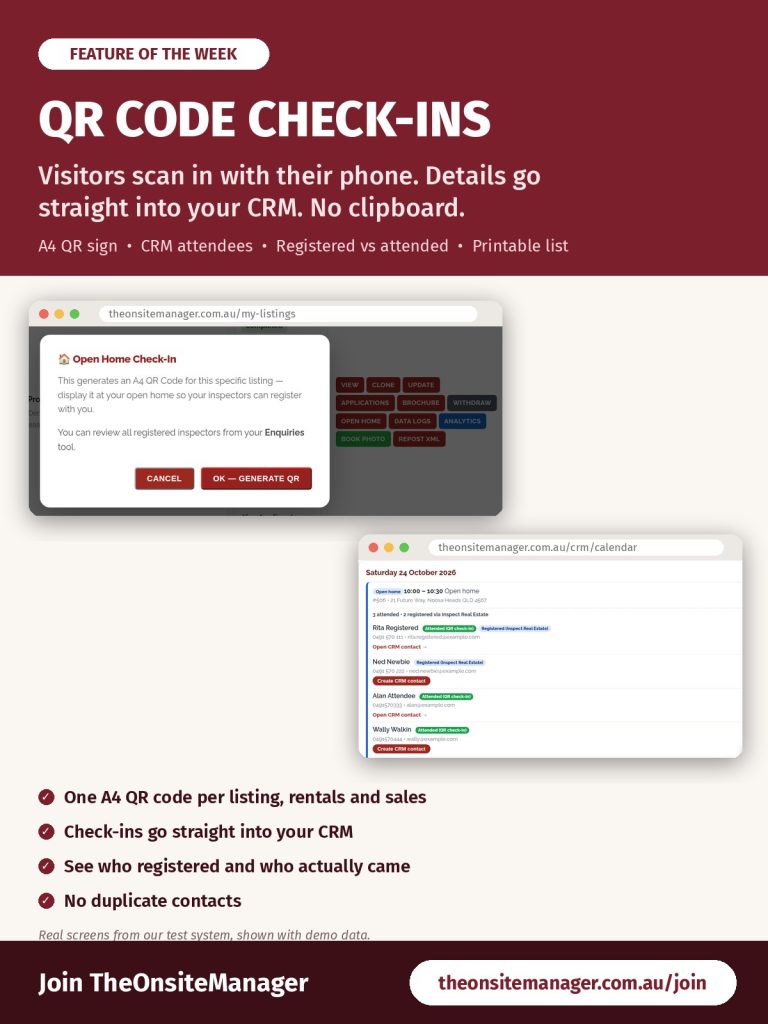
A clipboard at the door, a pen that doesn’t work, and a sign-in sheet full of names you can’t read and phone numbers with a digit missing. Then you type it all up after the open home. With TheOnsiteManager, visitors check themselves in with their phone and their details go straight into your CRM.
One tap to create your QR sign
On My Listings, choose OPEN HOME on the listing. You’ll see the message: “This generates an A4 QR Code for this specific listing — display it at your open home so your inspectors can register with you.” Choose OK — GENERATE QR and a printable A4 page with the QR code opens in a new tab. It works for both rentals and sales.
Put it at the door
Print the page, or show it on a tablet, and place it at the entrance. Visitors scan the code with their phone camera and enter their details. No paper sheets, no guessing at handwriting. Each QR code belongs to one listing, so print a new one for each property and never reuse a sheet from a different address.
See who came, straight away
After the open home, open the CRM and, on the Enquiries tab, use Filters to choose Open home attendee. Everyone who registered is there, ready for you to rate, add a note (Call, SMS or Email) and set a follow-up. Send the application link to interested renters the same day, while the property is still fresh in their minds.
Registered vs attended on the CRM Calendar
Open homes appear on the CRM Calendar from the inspection times on your listing. Click one to see who registered through Inspect Real Estate and who actually checked in with the QR code. Someone who did both shows both, and someone who registered but didn’t turn up at a past open home shows No check-in. If there’s no open home time on the listing, check-ins still appear as Open home (from QR check-ins).
A printed list with the QR built in
Choose Attendee list & print to get an A4 page with the address and time, everyone who registered, a Signature / notes column, five blank rows for walk-ins and the listing’s check-in QR code at the bottom (“Scan to check in”). Print it or save it as a PDF. It contains people’s contact details, so keep it secure and destroy it when you’re done.
No duplicate contacts
Each person is matched to your CRM contacts by email or mobile. Choose Open CRM contact to see their details, enquiries and notes, or Create CRM contact if they’re new. If a contact with the same email or mobile already exists, it’s used instead, so you won’t get duplicates.
Get started
Not with TheOnsiteManager yet? Sign Up Now and run your next open home without the clipboard.
Already with us? Add inspection times in Step 7 of the Listing Wizard, then choose OPEN HOME on My Listings before your next inspection. Step-by-step instructions are in Chapters 9 and 29 of the training manual.
Ready to join Australia’s agency for onsite managers? Sign Up Now.
(Screens shown are from our test system with demo data.)
